Showing posts with label birthday. Show all posts

Sunday, August 17, 2014

Expert Editing and More! (AG 2014 Part 2)

1 comments
In my last blog post about Applique Getaway 2014, I mentioned that I taught a class, FONTastic! Expert Editing and More! It was a really fun experience. I said I would share some of what I taught in a second blog post. I cannot type word for word what I covered, but I will hit the highlights to show off this cute custom birthday shirt I made:
using elements from these designs from the Itch 2 Stitch:
I walked through the design editing process in both Embird Editor and Embrilliance Essentials, not only to help those who already own one of the programs, but to show their different strengths for those who want to purchase software so they could make a more informed decision. I picked these two programs because they are comparable in price AND they are the only two I am familiar with. Ha!
Spoiler alert: I love both programs for different reasons and can't really recommend one over the other -- I'm glad I have both! :)

I will briefly describe my process in each program, then at the end you can download my handout that goes into a bit more details. This is NOT an exhaustive review of everything these programs are capable of. I simply created a project to walk through that shows off the features I use the most. I also have several disclosures/disclaimers that I will put in detail at the bottom (I don't work for either Embird or Embrilliance, read and follow the Terms of Use for the designs you purchase, do not share your merged design files with other embroiderers, edit at your own risk). Ok, here we go!

I opened the 2 from the Football Varsity Applique Numbers set. I deleted the white stripes and laces
  • Embird: right click the white color box and select "delete" color
  • Embrilliance: expand the design, highlight the white step and delete
I merged in the Fishing Puppy Applique Design, then deleted the pole, string, and hook.
  • Embird: you can do the same as above, but with a multistep design if you aren't sure which color stops are which, you can right click a color box, select "separate all colors" to break the design into multiple elements. Then the thumbnails will make it clear what colors you should delete. Delete the pole/string/hook. Select all and rejoin those items back together. 
  • Embrilliance: expand the design, highlight the three steps and delete
I merged in the Birthday Dino Box Applique to borrow his party hat! Use the same steps as above to remove everything from the design EXCEPT the placement/tackdown/satin/dot for the hat. 

I moved the hat over on top of the puppy and rotated it
  • Embird: select the "rotate mode" button in left toolbar to free rotate the object
  • Embrilliance: click on the little blue dot in the upper right corner of selected object and drag it to rotate
In Embird only, I adjusted the pull compensation of the puppy so the satin stitch width of the puppy matched the satin stitch width of the hat. I separated all colors of the puppy, selected just the satin stitch steps and went up to Edit -> Pull Compensation. Entering positive values increases pull compensation (makes it thicker) and negative values makes it thinner. I usually start with something like 0.2 or 0.3, undoing and trying again until it looks just right!
(It is my understanding you can adjust pull compensation in Embrilliance, but you have to own Enthusiast, too, which I do not have at this time) 

To make the puppy a bit more girly I added a heart to the collar. I first merged in the Love Bug Ladybug Applique then deleted everything but one little heart
  • Embird: select the love bug design. Then down in the lower right panel, click on one of the pink pink elements. In the workspace the item selected will turn red. I checked to make sure I had the right cheek heart highlighted, then right-click and select "delete all items except this one". BOOM the whole design is gone except for that little heart! 
  • Embrilliance: expand the design, highlight the pink step that contains two hearts and copy/paste. Now deleted the entire ladybug design, what you will have left is a new object that is just the hearts. To separate the hearts, you will watch it in stitch simulator, and add a color stop between the hearts. Then you can delete the left heart leaving behind the right heart. 
I reflected the heart so it was tilting the way I wanted
  • Embird: click the "mirror horizontally" button
  • Embrilliance: click the "flip horizontally" button
I removed the overlapped satin stitches from the designs elements that were being covered by a different applique design. 
  • Embird: I started with the dog/hat first. We do NOT want to mess with the placement and tackdown stitches, so on the bottom object click on the satin stitch step and select "hide all colors except this one". Then select the two overlapped applique objects and go to Edit -> Mask. This will remove the satin stitches that are under other stitches, but now we want to remove the stitches that will also be covered by fabric. Hide all colors of the top design, and then use the Freehand Select Mode to lasso the unwanted stitches. Click the split button, which will break those stitches out into it's own object, and delete it. Now join everything together and your little dog will have a fun party hat attached!
    Put the dog where you want on top of  the applique 2 and do that process of removing overlapped stitches again. 
  • Embrilliance: Position the dog/hat/heart exactly where you want on top of the 2. Assign "applique position" or "applique material" to each color of the placement/tackdown steps of all the applique elements. Then click the "remove hidden stitches" button and BOOM they are gone! Watch this Embrilliance video to see it in action: Remove Hidden Stitches
I recolored the design so my preview image in software would match as best as possible the threads I would actually choose at the machine. 
  • Embird: right click a color box in the upper right panel for a whole bunch of options, but most likely you will "select color from catalog" to change each color as needed
  • Embrilliance: click the color box in the lower right panel to select a new color. 
Last, I added the name using the 1.5" size of Twinkle Star! 
  • Embird: merge in the individual letter files. I rearranged the stitch order of the letters as needed by dragging and dropping them in the upper right hand panel. I roughly placed them where I wanted in a straight line, selected them all and used the "align" button to make more exact changes (align bottoms so they are perfectly straight, with the exception of the y that dangles below the baseline -- in that case you select a different letter like the n and the y, and align tops). Select all the letters, join them, then drag into position. 
  • Embrilliance: install the BX file that comes in the zip (assuming the digitizer includes it). Click the A button to create a lettering object, type the name, select the font and BOOM there it is! Drag into position.
In both cases since it was the same font/name/hoop, the name was too wide for the hoop, so I had to resize. Both programs you can either drag the design to the final size you want, you can adjust the size by typing in a percentage change, or adjust size by typing in an exact dimension. In Embird it is very important that if you attempt to resize and do not like the results, UNDO and try again from the original. Embird recalculates stitches with each change you make, and that can introduce errors with a cumulative negative effect. (Embrilliance does not recalculate stitches until you save, so you can play until your heart's content.)

Select everything and be sure it is centered in your hoop and still fits the hoop dimensions.
FINALLY Save As a new design name! Now sew!

One thing I wanted to point out at my machine -- remember how we did not change the placement and tackdown stitches and only deleted the overlapped satin stitches? Well this is what it looks like at the machine when you finish the 2: 
Trim those jumps and then run the placement stitch for the dog: 
The fabric is going to overlap. Sometimes that is ok sometimes, not. For example, when I laid the yellow fabric on top, the stripes show through!
I did not want stripes running through my dog, so I carefully trimmed away the parts of the 2 that would be covered by the dog fabric: 
And now I'm ready to continue on. That added extra step at the machine really helps the overall product look like it was digitized that way instead of merged. 
Special thanks to Whimsical Fabric for donating the lovely fabrics I used on this shirt! 

I *think* that accurately summarizes everything, but it is very hard to type it all out. I hope someday to record some new how-to videos, but that is still a ways off as I transition to a new computer. 

You can download a pdf of the handout we distributed at AG. Again, it is not word for word, but it does include images of the buttons I clicked for each step of the process.

And lastly, my disclosures/disclaimers:
I bought Embird Editor myself 7 years ago because my mother-in-law basically required me to before she gave me my embroidery machine, and I have used it basically every day since. Embrilliance Essentials and AlphaTricks Publisher were complimentary (as an employee of The Itch 2 Stitch) so I could create BX files for our fonts, and I've used it for 6 months. I am not an employee of either Embird or Embrilliance and I did not receiving kickbacks from either for teaching the class. I'm simply a fellow embroiderer showing off what you can do with good editing software. 

I used I2S designs and fonts in my class... and that's primarily because I was at AG with my boss! But I also have her permission to pick apart her designs to come up with something new. And that brings me to my first disclaimer -- please read the terms of use for the designs you buy and be sure to follow them. For the most part digitizers don't mind if you do design editing for personal use. But there are some who explicitly state "You may not use our designs or any parts of our designs to create a new design  for your own use."  Make sure you can abide by the TOU before purchasing. 

Assume the TOU for the original designs allow you to sell final products, then you could do something like take an apple from one digitizer's designs, borrow some eyes from a second design, pluck some sunglasses off of a third design and add "School is Cool" using a font to make a custom design to stitch on a shirt for your kid or for a customer. But you CANNOT share or sell that design file to another embroiderer. You did not digitize any part of that merged design, and therefore do not have the rights to distribute the design to anyone else. If a friend a couple states away wants to make one too... she would have to buy all the designs and merge it herself. 

And finally... as soon as you open a design in software to resize, rearrange stitch order, delete elements, add elements, adjust pull compensation... you have basically voided the warranty so to speak. A digitizer cannot guarantee a proper stitchout once you have modified the original file. So edit at your own risk!! I am very confident in Embird's abilities to edit designs, but that's because I have put it to the test and been pleased with the results. Do not take my word for it! Test your first merge jobs on scraps before putting it on a valuable blank. 

Ok, now, go have fun! 


Wednesday, June 18, 2014

Bubble Buckies for the Birthday Girl

1 comments
My niece turned two last week. When I asked if there was any special theme for her celebration, her mommy said that Gabriella really liked Bubble Guppies. It's amazing how fast you can get out of the realm of toddler shows because I know nothing about Bubble Guppies, ha! But I had a cute mermaid design in my stash, so I put together this for her to wear. Once completed, when Gabriella saw it she exclaimed "Bubble Buckies!" so apparently it was a win!
The applique 2 is from Happytown's Swanky Numbers Applique set. The mermaid cutie was from The Applique Club, and I added her name with DBJJ's Ruby font. Using Embrilliance Essentials it was so easy to remove hidden stitches from the overlapped appliques and curve the text around the 2.

Thursday, April 10, 2014

Annaliese is TEN!

2 comments
I feel like I say this with shock and dismay every year, but today is my daughter's birthday and she's 10. TEN! Double digits! How is that even possible?!
Thankfully she still loves to wear applique shirts so I got to make something special for her yet again:
She requested this herself, a cake plate where the pedestal is a 10. Clever idea, right? And not only does she still like applique shirts, she specifically wanted this puff sleeves and ruffle bottom shirt :)
I started with I2S's Cake on Stand, but I deleted out the pedestal and inserted the numbers from One Thing. Annaliese picked the fabrics and threads herself! Thankfully they were EXACTLY what I had envisioned using, too. Yay! Easy Peasy project.
I love my girl, she makes parenthood a delight!

Monday, April 7, 2014

Castle Frame fit for a little Princess!

0 comments
So I'm not taking orders. I'm not. But sometimes if you ask at the very right minute... I might say yes. Ha! If it's a "two birds with one stone" kinda situation.
A friend asked if I had time to make a birthday shirt for her sweet little girl. We were chatting on fb at the exact moment I was updating the LP testing database for new designs.
I told my friend that I was sorry, but I didn't have time.
Then a moment later said, "hold up, princess themed??"
I gave her one option, this sweet Swirly Split Castle Applique that I had the opportunity to test for LP. She loved it, and I got it done the next day!

Isn't this a great design?! One fabric, the beauty is in all the embroidery. I added Kendal and the 3 with LP's Strawberry Limeade.
And guess what?! If you do custom embroidery yourself, you can go grab it for free from LP's site for a limited time. HURRY!

Thursday, December 19, 2013

Man of 5teel

0 comments
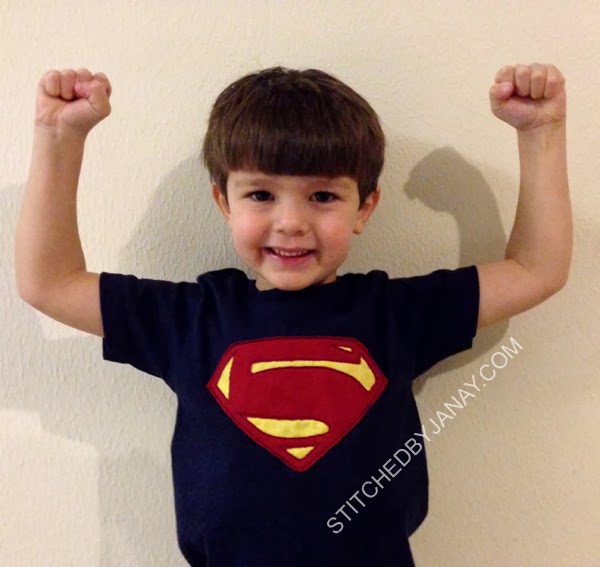
Today my little man is FIVE! I'm not going to dwell on it much because I might cry. So let's talk about his shirt!
This kid is way into superheroes and has been his whole life. With the exception of his first birthday I have made a superhero themed shirt for all of his previous birthdays: Two-perman, Boy Wond3r, The 4lash, and now let me introduce you to my little Man of 5teel!!
We went back to Superman. We brainstormed all year for a different superhero to create a five emblem out of, but just couldn't think of anything. The reality is he LOVES Superman, was getting a Superman Imaginext set for his birthday, Man of Steel came out this year (not that he's seen it...) and frankly, an S looks a lot like a 5! Ha!
I digitized this myself using the same style as his Batman Beyond shirt (and the Super Seven shirt I made for Sean). I tacked down knit with a triple bean stitch, and trimmed leaving a raw edge exposed. Gotta love a design with a 4 minute stitch time!!
I based the emblem after the most recent Man of Steel symbol, but drew it to look a bit more like a five.
I was pleased with the results, and he loves it, which is the most important part. :)  He's a super kid and I'm thrilled he's mine!

Monday, November 25, 2013

Cayden is 5!

0 comments
As we approached Cayden's 4th birthday, he was into Teenage Mutant Ninja Turtles. I couldn't find any good "inspired" designs to buy so I created my own, remember that? (you can see it here) Well when I posted a pic of it in an applique group, Lyndsie of Lynnie Pinnie asked if she could digitize a set of Ninja numbers based on my idea, remember that? (I blogged about it here, and again here).
Well the boy that inspired it all is now FIVE and still likes TMNT! :)
This year instead of cobbling together my own ninja 5, I used the one in LP's set. I added his name with 8CP's Chinese Take Away.

Sunday, November 24, 2013

Maclain is two!

1 comments
My little friend Maclain turned 2 and had her party a Chic-fil-A, so as any good chicken-eating girl would do, she wore a cow themed outfit! :) Her mommy made her adorable ruffle pants out of cow print fabric, and I supplied the shirt:
This sweet design is from DBJJ's Cupcake Critters set. Using a pale gray to outline the cow really helped make a white cow on a white shirt visible. :) I added her name with I2S's Jack and Jill.
And here's the birthday girl herself. Don't you just love the scrunchy-faced grins of new two year olds?!

Thursday, November 21, 2013

Super Seven!

0 comments
It's birthday time for Sean again! This year he had a Superman themed party, and his mommy gave me freedom to play with design ideas. This is something I did completely all on my own! (Pats self on back)
I do own a set of applique designs that is the alphabet done in the Superman shield style, but it doesn't include numbers. I wasn't finding anything good from trusted sources online, so I made my own! I drew the seven in the shield myself in Embird Studio and created this bean stitch design. I used knits so it wouldn't fray. This style is a nice way to do applique for boys that are getting older.
Oh, I guess I didn't do it COMPLETELY by myself, I did use 8CP's Gadzooks to add his name. Love that font! Perfect for superhero stuff.
Isn't he adorable?! Happy Birthday, Sean!

Saturday, August 10, 2013

Happy Birthday, Emily!

0 comments
Today we attended a first birthday party, and my gift was a bib for Emily to wear while eating her cake!
Pink ladybug theme, so I merged this together. GG Designs' Chubby Wubby 1, MCA's Ladybug, Jolson's Hand Lettered Floss Stitch font, and one of the flutter trails from That's Sew Grammy's Just Bug Trails set (which is a nice bean stitch, I ended up stitching 2 or 3 times to match the heaving stitching of the floss stitch font).

Thursday, August 1, 2013

Happy Birthday, Ailynn!

0 comments
Today my other little niece turned one, so again I used it as an excuse to try a set of designs that have been sitting in my stash for a while. I love how it turned out!
The candle numbers are from Hooked on Appliqué. This was the first time I have used designs from HOA, and it was digitized exactly like I prefer: single running stitch placement, single running stitch tackdown, double zigzag underlay before satin stitches with great width. Nice coverage, great corners, good sequencing, all around very pleased! I added her name with 8CP's Reba:

Monday, June 17, 2013

Birthday designs inspired by party themes

0 comments
I avoid purchasing and using designs of characters I am not licensed to sell, so when friends ask me to make a birthday shirt to match a theme, I use it as an opportunity to be creative. :)  Today I'm going to share with you two older projects that I haven't blogged about yet.
Cayden celebrated his fourth birthday in November Teenage Mutant Ninja Turtle style, so I created this!
I started with 8CP's Chatty applique 4. I added triple bean stitch tackdown lines for the bands of blue knit, letting them hang out on the right side of satin stitching. I tied them in a knot and trimmed the edges. So proud of myself, *I* digitized the eyes. They aren't perfect, but got the job done! Found a free ttf that matches the TMNT logo and my MIL digitized the name for me. I borrowed my husband's action figure (yes husband, not son) to pick my green fabric. :)
The reason I have held off on blogging about this particular shirt is because a new design set from Lynnie Pinnie based on this project is in the works! The 4x4 sizes of the designs have been sent to us testers. I'll post my pictures of those tomorrow. It's really neat to see a brainstorming idea of mine come to life in the hands of a real digitizer!

A couple weeks before making Cayden's shirt, I also made a birthday shirt for Sean. His party theme was Super Mario Bros. and this is what I came up with:
I used the 6 from GG Designs' Chubby Wubby Numbers. Before starting though, I pieced together a pair of overalls by putting two strips of blue on green fabric, and then adding that to a larger piece of blue fabric. Once I had that done, I tacked it down as one big piece to trim out.
I merged in a couple embroidered buttons (plucked from LP's Cupcake design), and used Embird alphabet 30 to add his name (closest I could find to match the logo).
 Both of these were fun projects that stretched me to think outside the box and try something new!

Tuesday, June 11, 2013

Balloons for the birthday girl

0 comments
One of my nieces celebrated her first birthday over the weekend. Her mommy gave me free reign on the onesie, so I used it as an opportunity to try something new! (I don't know if I'm capable of settling on a favorite and sticking with it...)
The birthday balloons design set is from East Coast Applique. Such a neat set, includes #1-9!

Saturday, May 18, 2013

Celebrating Gymnastics Style!

1 comments
My little friend Maddie turned three and is celebrating with a gymnastics theme. Her mommy bought this cute leotard, showed me the customized party decor she ordered from Etsy, and I got to work putting together a coordinating design!
The applique M is from EB's Swirly Applique. The little girl is from DBJJ's Cute Gymnasts. I added the "3" using an Embird Alphabet. It was a subtle way to add her age, and I love how it turned out!

Saturday, April 27, 2013

Happy Birthday, Nathan!

1 comments
Nathan is celebrating his birthday Toy Story style. When his mommy showed him a couple options (like Maddox's Space Explorer shirt, or Jimmie and Jackson's birthday shirts) he picked the number four design!
The Box Font numbers are from Itch 2 Stitch. I added his name with 8CP's Tiny. We found the fabric at Hobby Lobby.

Wednesday, April 10, 2013

Annaliese is NINE!

0 comments
Today my girl is NINE! I can't believe it!
This year we selected Itch2Stitch's Cupcake Box design for her birthday shirt, primarily because it came with a 2.5" version just perfect for an American Girl doll shirt. Color palette was picked to match these shorts.
We contemplated putting a 9 in the cupcake wrapper, but Annaliese decided to go with something more subtle, so we added nine sprinkles to the cupcake. I used Quirky from I2S to add their names.
This doll shirt is from ARB Blanks:
I made Annaliese and Anna's shirts last week, so proud of myself for getting them done early! Over the weekend we went to Build-A-Bear and she made a Rainbow Dash. Once we were home she asked if she had any shirts that matched BAB shirts. Sadly, she's outgrown all the things I made a few years ago when she got her first BAB. So I whipped up a little surprise for her this morning, a "shirt" for Rainbow Dash. :)
I had to be creative, dressing a pony with wings is very different than a traditional teddy bear! I have some 0-3 month side snap shirts in my stash, and thought that would be easy since it wraps around. I cut slits for the wings and tail, and appliqued the cake patch right where her cutie mark is. It's not perfect, but it got the job done. :)
 I have two more of those shirts so you might see some more in the future!

Tuesday, March 26, 2013

Yeehaw! Kendal is Two!

0 comments
We are disappointed we can't make it to Kendal's Shindig this weekend, but that didn't stop me from making a cute shirt for her to wear :)
The applique 2 is from GG's Chubby Wubby Numbers. I borrowed the hat from 8CP's Cowgirl 1 Applique and added her name with 8CP's Clay.

Tuesday, March 19, 2013

Riley is Two!

0 comments
Even though I've done quite a bit of stitching for little Riley, it's hard to believe she is already two!
 When Michelle asked me to make her birthday shirt, she specifically requested the Split Numbers from Savvy Stitches Applique. I used 8CP's Mandi to add her name.

Labels


Statcounter

Followers

My Blog List

Stitched By Janay Original Template Copyright 2008, based on Shoppaholic Designed by Ipiet Templates